
GSTR-2A and GSTR-2B purchase reconciliation
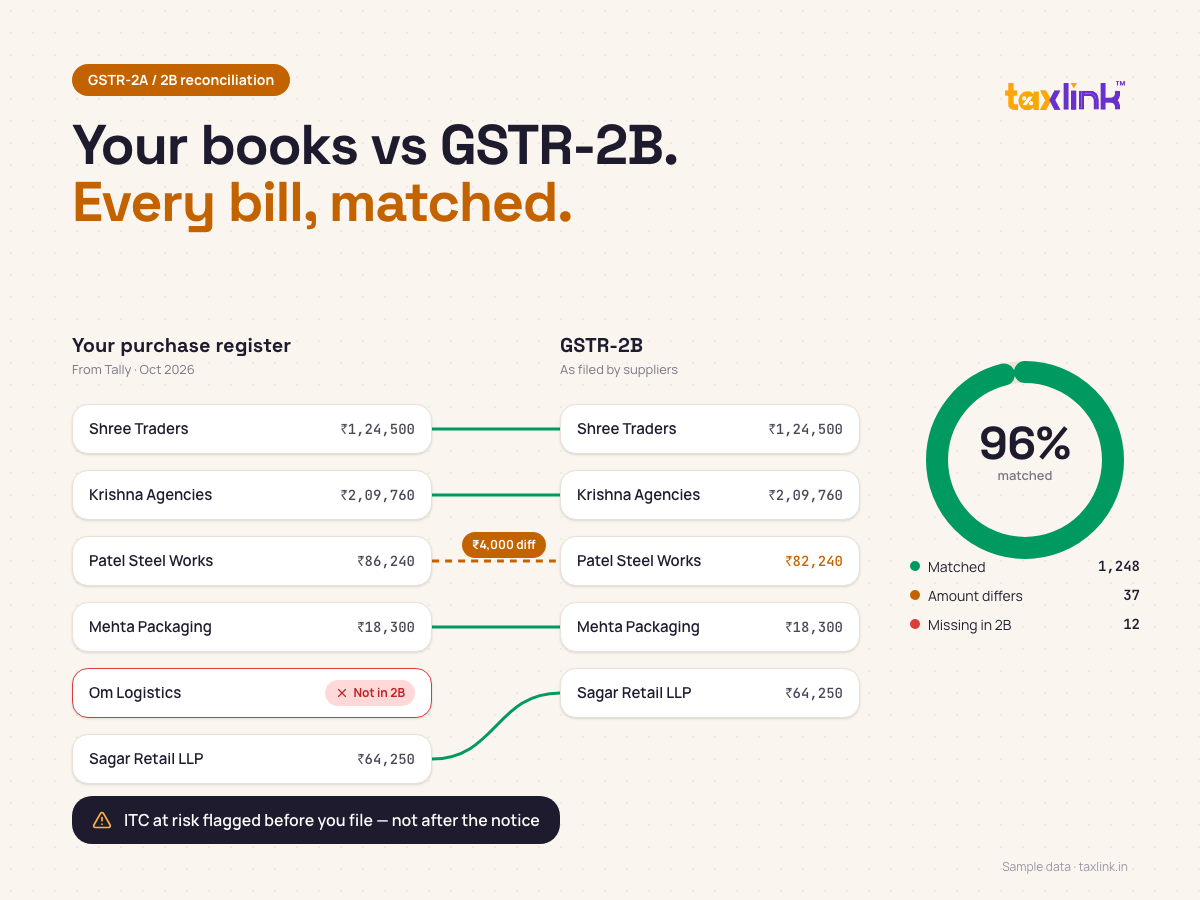
Taxlink reconciles every purchase voucher in your books against GSTR-2A and GSTR-2B and shows which invoices are matched, mismatched or missing — so you can follow up with suppliers before input tax credit is at risk.
CAs reconcile purchase books with GSTR-2A and GSTR-2B to catch missing supplier invoices, wrong GSTINs, and ITC risk before filing.
Used by CAs + Accountants · ₹8,000 + GST/year with every module · Works with your existing Tally
Purchase vouchers from your books
The problem
What this solves for your practice
Portal downloads and Tally purchase data live in different places. Matching invoice by invoice in Excel each month wastes senior time. Taxlink works on purchase vouchers already synced from Tally and shows match status against GSTR-2A and GSTR-2B in one grid.
How it works
Three steps, start to finish
- 1
Start from your books
Purchase vouchers come straight from the synced Tally data.
- 2
Matched against 2A and 2B
Each voucher is checked against both returns in one run.
- 3
Act on the exceptions
Matched, mismatched and missing at a glance — follow up only where ITC is at risk.
Full workflow
From upload to Tally — step by step
- 1
Sync purchase vouchers from Tally
Run the Connector so current purchase vouchers and party GSTINs are in Taxlink.
- 2
Load GSTR-2A / 2B data
Use Taxlink's GST reconciliation module with returns data available for the tax period (as per your usual filing workflow in the product).
- 3
Review match statuses
Each voucher shows matched, mismatched, missing, or pending against 2A and 2B. Filter to the statuses you need to clear before 3B.
- 4
Follow up and refresh
Send mismatch lists to suppliers. After they file or amend, refresh reconciliation so statuses update.
- 5
Reconcile pending in bulk
Where the product allows, reconcile all pending vouchers in one action after you have verified the underlying data.
Examples
How firms use this in practice
Missing invoice in 2B
A purchase voucher exists in Tally but not in GSTR-2B — flagged as missing so you can chase the supplier before claiming ITC.
Amount mismatch
Invoice number matches but taxable value differs — marked mismatched with party name and date visible for a quick call to the vendor.
Post-amendment refresh
Supplier files a corrected GSTR-1; you refresh reconciliation and pending lines move to matched.
Supported inputs
Formats and compatibility
- Purchase vouchers synced from Tally (not manual Excel books)
- GSTR-2A and GSTR-2B reconciliation views in Taxlink
- Filters by match status, party, and period
Limitations to know
- Reconciliation quality depends on accurate purchase entry and GSTIN in Tally.
- Supplier delay in filing will show vouchers as missing or pending — not a Taxlink error.
- Does not replace statutory filing on the GST portal; it prepares your review inside Taxlink.
Troubleshooting
Common errors and fixes
What's included
Everything you need for this job
- Match status against both GSTR-2A and GSTR-2B for every voucher
- Filters for matched, mismatched, missing and pending invoices
- Reconcile all pending vouchers in one click
- Works on purchase vouchers synced from Tally
- Party name, GSTIN, invoice date and amount on every line
- Refresh status any time after suppliers file
Guides
Related articles
FAQ
Common questions
Close books faster. Serve more clients.
Join CAs + Accountants who turned hours of data entry into minutes of review. Every module, ₹8,000 + GST a year — try it free for 7 days.